Create variations of your project
Last updated: April 13, 2026
This article covers how to use variants to create multiple versions of the same project — for example, different lengths, audiences, or languages — without duplicating the entire file.
Note that Variations is a feature exclusive to our Pro and Enterprise plan subscribers.
What is a variant?
Every project has a Default variant. This is the primary version. You can create additional named variants that branch from Default, each editable independently.
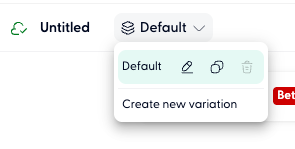
The current variant is shown in the variant selector in the top toolbar, next to the project name. It displays "Default" unless you're viewing a custom variant.
Creating a new variant
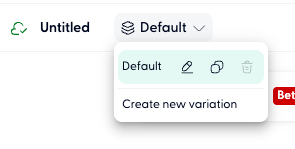
In the top toolbar, click the variant selector (shows "Default" by default).
Click Create mew variant from the dropdown.
Give the variant a name - for example, "30 sec version", "French", or "LinkedIn cut."
The new variant is created as a copy of your current Default project, ready to edit independently.
Switching between variants
Click the variant selector in the toolbar at any time to switch. Each variant maintains its own timeline, clips, script, and settings.
Editing a variant
Once inside a variant, all edits apply only to that variant. You can:
Change the script or voiceover
Swap visuals or avatars
Adjust timing and duration
Change music or sound effects
Modify captions or layout mode
Changes to a variant do not affect the Default or any other variant.
You can rename or delete a variant from the variant selector dropdown.
Exporting a specific variant
When you click Export or Share, the export applies to whichever variant is currently active. Switch to the desired variant before exporting to produce the correct version.
This lets you generate multiple final outputs (e.g. a 60-second ad and a 30-second cut) from a single project file.
Using Wonda with variants
Wonda operates within whichever variant is currently active. You can ask Wonda to make edits, and they will only affect the active variant.
To create a variant with Wonda, try prompts like:
"Create a 30-second version of this ad"
"Translate this project into French"