How are credits charged?
Last updated: August 16, 2026
Wondercraft charges credits when you:
Generate new assets with AI (speech, images, videos, music and SFX)
Chatting with Wonda (after exceeding the daily free messages count)
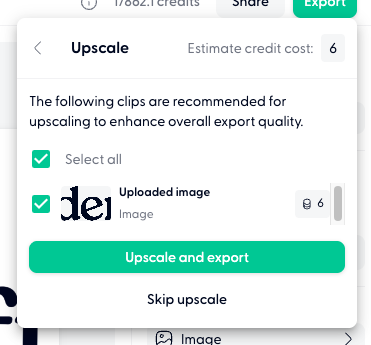
Upscaling your assets, whether generated on Wondercraft or uploaded
Detailed credit charges
Avatar Videos
Model name | Credits/second |
VEED Fabric 1.0 | 8 |
Other AI-generated Videos
Video generation costs are calculated as: clip length (in seconds) × per‑second rate. For example, with a model charging 5 credits/second: a 3‑second clip costs 15 credits, a 5‑second clip costs 25 credits, an 8‑second clip costs 40 credits, and a 12‑second clip costs 60 credits. The per‑second rate is displayed underneath each model option when selecting a video model.
The same applies to video generations: if a video generation fails outright, no credits are charged for that failed attempt.
AI-generated Images
Image generation costs are calculated as per-image, and resolution chosen. The per‑image rate is displayed underneath each model option when selecting a image model. The default resolution is costing the lower rate.
AI-generated Music
Music generation costs are calculated as: clip length (in seconds) × per‑minute rate. For example, with a model charging 5 credits/minute: a 3‑minutes clip costs 15 credits, a 5‑minutes clip costs 25 credits, and an 8‑minutes clip costs 40 credits. The per‑minute rate is displayed underneath each model option when selecting a music model.
Sound Effects (SFX)
Generating any SFX costs 2.5 credits/generation.
Speech
10 credits/minute of speech generated.
For example, a 10 minute podcast will cost 100 credits, and a 25 minute podcast will cost 250 credits.
The charge is the same for generations in standard mode and Convo Mode, both costing 10 credits/minute of speech generated.
We charge you when you first generate a speech clip. After that, you receive 2 free regenerations (only for paid subscribers), provided the changes you've made to the script are less than 25 characters
Parrot mode costs 20 credits/minute of speech generated.
Director mode costs 20 credits/minute of speech generated.
Failed generations: Failed Convo Mode generation attempts (due to alignment errors or upstream model issues) do not consume credits for the failed render itself. However, credits may still be charged for individual voice/speech generations made while building the script and previewing voices before the final render attempt.
Credits are only charged when audio generation succeeds. If voice generation fails, no credits are deducted and you can retry at no cost.
Wonda Messages
Each message with Wonda costs credits. Credits charged are variable depending on the complexity of the task you asked Wonda to do, and what model you selected
For example, saying "Hello" to Wonda results in negligible credits used, but asking to create a 20-min video with specific instructions will consume a lot more
In terms of models:
Claude is the best model for complex video creation tasks and is the most expensive.
GPT is best for routine video creation tasks and is cheaper than Claude.
Minimax is best for simple video creation tasks and is the cheapest.
Example of actions that cost credits:
Generating speech/narration audio
Generating AI images
Generating AI Video clips or Avatar Videos (these are the most expensive)
Generating new music with AI
Chatting with Wonda — planning, outlining, brainstorming, script writing in chat
Wonda reading/inspecting your existing project
Creating empty placeholder clips on the timeline
Adding music clips from the library to your timeline or deleting them
Upscaling visual assets
When you export in a higher resolution, we would offer to upscale the visual assets that are lower resolution. You can choose the assets you wish to upscale, or skip upscaling them.
Best practices for managing costs
Calculate costs before generating: Multiply seconds × rate × number of clips to estimate the total cost
Test first: Generate one clip with your chosen settings to verify the result before batch generating
Use shorter clips: Most B-roll works well at 4-5 seconds. Going from 12s to 5s cuts cost by 60% for the same shot
Check your library first: Review previously generated content before creating new assets
Do it manually for small/quick edits
Credit rollovers
Unused credits roll over into the next month for our paid subscribers. For more information see 📄 Do unused credits rollover?